![Incrmntal Logo.png]](https://knowledgebase.incrmntal.com/hs-fs/hubfs/Incrmntal%20Logo.png?height=40&name=Incrmntal%20Logo.png)
INCRMNTAL can be incorporated directly into your day-to-day and week-to-week budget optimization workflow. Marketing teams can use the platform regularly to evaluate channel performance, identify where incremental efficiency is strongest, and make informed budget adjustments.
At its core, INCRMNTAL helps marketing teams answer a key operational question: “Where should I move budget next week to generate more incremental value?”
What Weekly Allocation Decisions Should Be Based On
Weekly optimization in INCRMNTAL relies on two metrics:
1. Contribution of your main KPI - Overall contribution represents the overall incremental value a channel generates at its current spend level.
-
-
Channels whose incremental KPI meets or exceeds target are good candidates for continued investment.
-
Channels that consistently underperform may require budget reduction.
-
-
- Marginal is the primary indicator for weekly scaling decisions because it shows whether a channel still has room to grow efficiently.
These metrics help determine:
- Is this channel generally a good use of budget?
- If we increase budget now, how efficient will the next result be?
Your main KPI should match the metric your team optimizes for internally. Common examples include:
- ROAS (D7 / D30)
- CPI
- etc
Channels should be evaluated against this KPI in Explorer.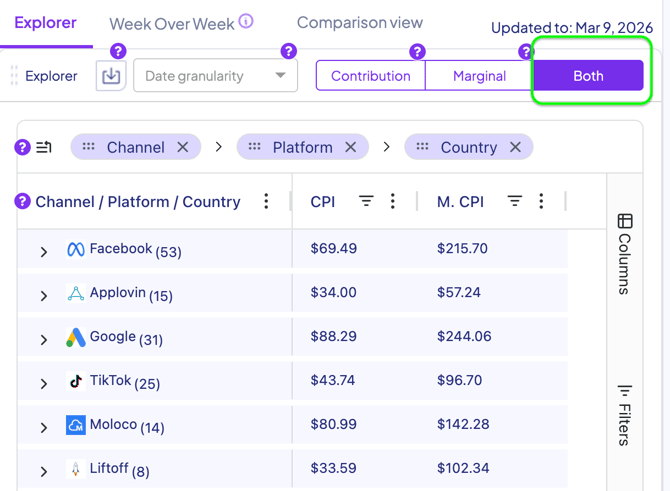
Weekly Optimization Workflow
Follow this process when making weekly budget allocation decisions.
1. Select the Market , KPI and Time Frame
Review channel performance within the same country / platform using your primary KPI.
For Weekly budget Optimization, set Explorer's granularity to weekly and look for the past 2 weeks changes to see the dynamics.
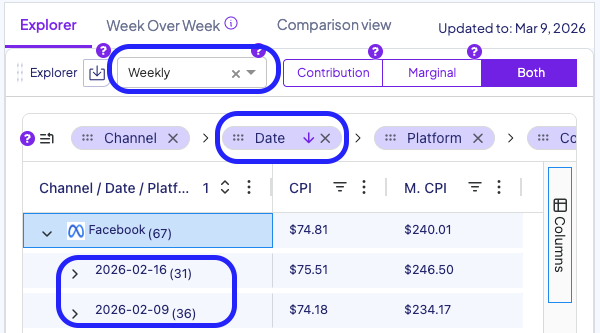
2. Identify Channels with Strong Contribution
Start with channels generating positive incremental impact relative to your KPI benchmark. These channels are candidates for maintaining or increasing spend.
Then Identify channels where both Contribution values are poor - These channels are candidates for spend decrease.
3. Compare Marginal Performance
Evaluate marginal efficiency:
- Across channels
- Relative to historical marginal values for the same channel
This helps identify where additional budget is likely to generate the strongest incremental return.
4. Reallocate Budget
Based on contribution and marginal performance:
- Scale up channels with strong contribution and healthy marginal efficiency
- Maintain channels where marginal indicates limited additional efficiency
- Scale down channels where both metrics are weak
Budget Reallocation Example
Weekly budget optimization typically involves shifting spend between channels. The amount of budget moved will depend both on your weekly established budget and on the Contribution and Marginal values observed in the platform.
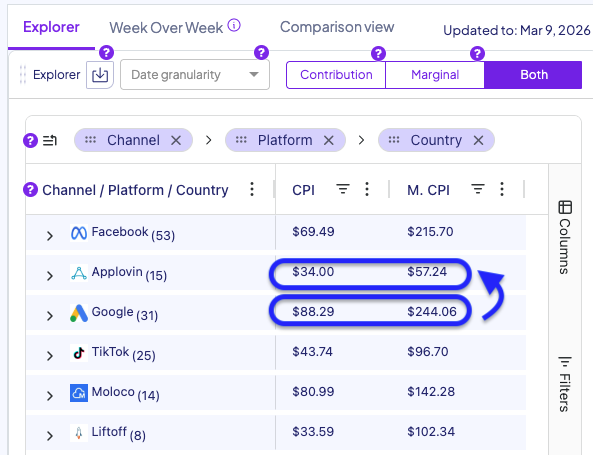
Example: If Google is underperforming based on high Contribution and Marginal values, its weekly budget may be reduced by $15K.
That budget can then be redistributed toward channels with stronger incremental efficiency, based on their marginal performance and available room to scale.
Example reallocations:
-
$15K can be moved from Google to Applovin, as it shows strong marginal efficiency and clear scaling potential
-
$10K can be moved to Applovin and $5K to Molovo, both channels demonstrate healthy Contribution values, however, marginal performance of Applovin leaves more room for scaling
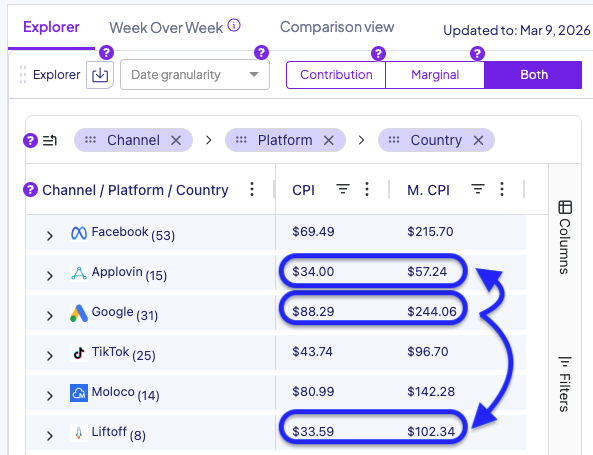
This approach ensures that budget is continuously directed toward channels with the strongest incremental growth potential, while staying within the constraints of your weekly allocation.
A typical weekly process:
Start of the week :
-
Review Explorer for your main KPI across channels within each market.
-
Adjust Budgets based on your weekly budget limitation, latest Contribution amd Marginal values for the previous period
-
Allow campaigns to run and review results the following week.
Key Takeaway
Use Contribution to determine which channels deserve budget.
Use Marginal to decide where next week’s budget should go.
For any question please contact onboarding@incrmntal.com , or open a support Ticket here