![Incrmntal Logo.png]](https://knowledgebase.incrmntal.com/hs-fs/hubfs/Incrmntal%20Logo.png?height=40&name=Incrmntal%20Logo.png)
What Explorer Reflects
The Explorer Dashboard provides a view of a channel/campaign’s true incremental value over time on top of your Organic layer and External activities. It shows how much value your Channel/Campaign has contributed based on its total spend to your Market (OS and Country). This view is parallel to the Attribution view in terms of granularity and data presentation, but is built solely on INCRMNTAL Models.
It reflects performance based on:
- Historical data
- Observed changes in spend and activity
- The channel’s role within the full marketing mix
When a New Channel Can Be Evaluated
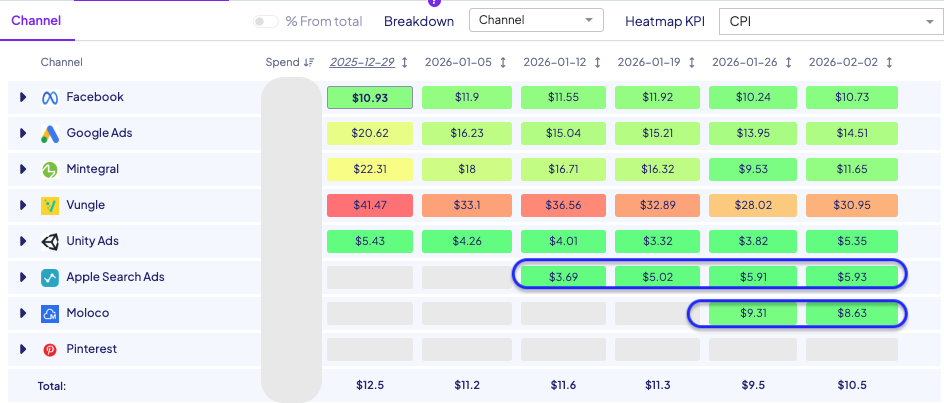
A new channel can be evaluated in Explorer once it has generated a few changes or fluctuations in spend, allowing the model to start building a picture of incrementality:
- A few changes in spend (increases, decreases, reallocations)
- Around 2–4 weeks of activity
- Enough time for conversion windows (e.g., D7, D14) to mature
Before this point, the channel may still appear in Explorer, but results should be treated as directional.
Why Spend Changes Are Required
Explorer does not evaluate a single event. It learns from how performance changes across multiple activities.
For a new channel, a few activities are necessary to:
- Create variation in the data
- Allow the model to separate signal from baseline performance
How to Evaluate a New Channel in Explorer
In Explorer, a new channel should be evaluated based on Contribution.
Contribution represents the total incremental value generated by the channel across all observed spend levels.
- If Contribution is high, this indicates that starting the channel generated incremental value and contributing to your market (country × OS).
- If Contribution is low, this suggests that the channel launch is not delivering significant incremental impact.
- By looking at your New Channel Performance on different spend levels, you can assess how performance changes as spend increases or decreases - Can this channel scale efficiencies
You can read here about How to make Decisions with INCRMNTAL Explorer.
Summary
Explorer is a great tool to help you access whether Launching a New Channel brought incremental (additional) value to your market.
To ensure reliable insights:
- A few fluctuations in spend is needed
- Allow 2–4+ weeks of data accumulation
This enables a clear understanding of whether the channel is generating true incremental value or capturing demand that would have occurred regardless.